

ALL IN ONE DIGITAL PLANNER (English Version)
ALL IN ONE DIGITAL PLANNER (English Version)
- Different themes & Template sections
- Unique and colorful stickers
- Maximum privacy
- Instant download
- Quick installation
- Easy to use
- Multi-device synchronization
-
 Compatible with Apple
-
 Compatible with Android
-
 Compatible with Microsoft
- Step-by-step guide
Easy Pack 🌱
Premium Pack 🪴
Life Pack 🌳
Dated Version
2025–2027
+
Undated Version
(Reusable for life)
Dated Version
2025–2031
+
Undated Version
(Reusable for life)
Dated Version
2025–2036
+
Undated Version
(Reusable for life)
STICKERS
+1,000
STICKERS
+50,000
STICKERS
+75,000
TEMPLATE SECTION
+150
TEMPLATE SECTION
+300
TEMPLATE SECTION
+500
DIFFERENT THEMES & COLORS
❌
DIFFERENT THEMES & COLORS
✅
DIFFERENT THEMES & COLORS
✅
ANNUAL UPDATES
❌
ANNUAL UPDATES
✅
ANNUAL UPDATES
✅
+150 COVERS
❌
+150 COVERS
❌
+150 COVERS
✅
PRIORITY ACCESS TO NEW FEATURES
❌
PRIORITY ACCESS TO NEW FEATURES
❌
PRIORITY ACCESS TO NEW FEATURES
✅


🚫 It is not a subscription! 🚫

- 🔐 100% Secure payment guaranteed
- 📥 Instant download after purchase
Why
Always Planner ?
Read the experiences of over
200,000 people who have already chosen Always Planner, and start
optimizing your days too.
 ★★★★★
(5 • Excellent)
★★★★★
(5 • Excellent)
 ★★★★★
(5 • Excellent)
★★★★★
(5 • Excellent)
 ★★★★★
(5 • Excellent)
★★★★★
(5 • Excellent)
 ★★★★★
(5 • Excellent)
★★★★★
(5 • Excellent)
 ★★★★★
(5 • Excellent)
★★★★★
(5 • Excellent)
 ★★★★★
(5 • Excellent)
★★★★★
(5 • Excellent)
 ★★★★★
(5 • Excellent)
★★★★★
(5 • Excellent)
 ★★★★★
(5 • Excellent)
★★★★★
(5 • Excellent)
 ★★★★★
(5 • Excellent)
★★★★★
(5 • Excellent)
 ★★★★★
(5 • Excellent)
★★★★★
(5 • Excellent)
 ★★★★★
(5 • Excellent)
★★★★★
(5 • Excellent)
 ★★★★★
(5 • Excellent)
★★★★★
(5 • Excellent)
 ★★★★★
(5 • Excellent)
★★★★★
(5 • Excellent)
 ★★★★★
(5 • Excellent)
★★★★★
(5 • Excellent)
 ★★★★★
(5 • Excellent)
★★★★★
(5 • Excellent)
 ★★★★★
(5 • Excellent)
★★★★★
(5 • Excellent)
 ★★★★★
(5 • Excellent)
★★★★★
(5 • Excellent)
 ★★★★★
(5 • Excellent)
★★★★★
(5 • Excellent)
 ★★★★★
(5 • Excellent)
★★★★★
(5 • Excellent)
 ★★★★★
(5 • Excellent)
★★★★★
(5 • Excellent)
 ★★★★★
(5 • Excellent)
★★★★★
(5 • Excellent)
 ★★★★★
(5 • Excellent)
★★★★★
(5 • Excellent)
 ★★★★★
(5 • Excellent)
★★★★★
(5 • Excellent)
 ★★★★★
(5 • Excellent)
★★★★★
(5 • Excellent)
 ★★★★★
(5 • Excellent)
★★★★★
(5 • Excellent)
 ★★★★★
(5 • Excellent)
★★★★★
(5 • Excellent)
 ★★★★★
(5 • Excellent)
★★★★★
(5 • Excellent)
 ★★★★★
(5 • Excellent)
★★★★★
(5 • Excellent)
 ★★★★★
(5 • Excellent)
★★★★★
(5 • Excellent)
 ★★★★★
(5 • Excellent)
★★★★★
(5 • Excellent)
 ★★★★★
(5 • Excellent)
★★★★★
(5 • Excellent)
★★★★★
(5 • Excellent)
★★★★★
(5 • Excellent)
 ★★★★★
(5 • Excellent)
★★★★★
(5 • Excellent)
 ★★★★★
(5 • Excellent)
★★★★★
(5 • Excellent)
 ★★★★★
(5 • Excellent)
★★★★★
(5 • Excellent)
Choose Your Pack
Easy Pack
- 🔐 100% Secure payment
- 📥 Instant download
Premium Pack
- 🔐 100% Secure payment
- 📥 Instant download
Life Pack
- 🔐 100% Secure payment
- 📥 Instant download
Easy to use
Planning has never been so intuitive.
Quick and easy navigation

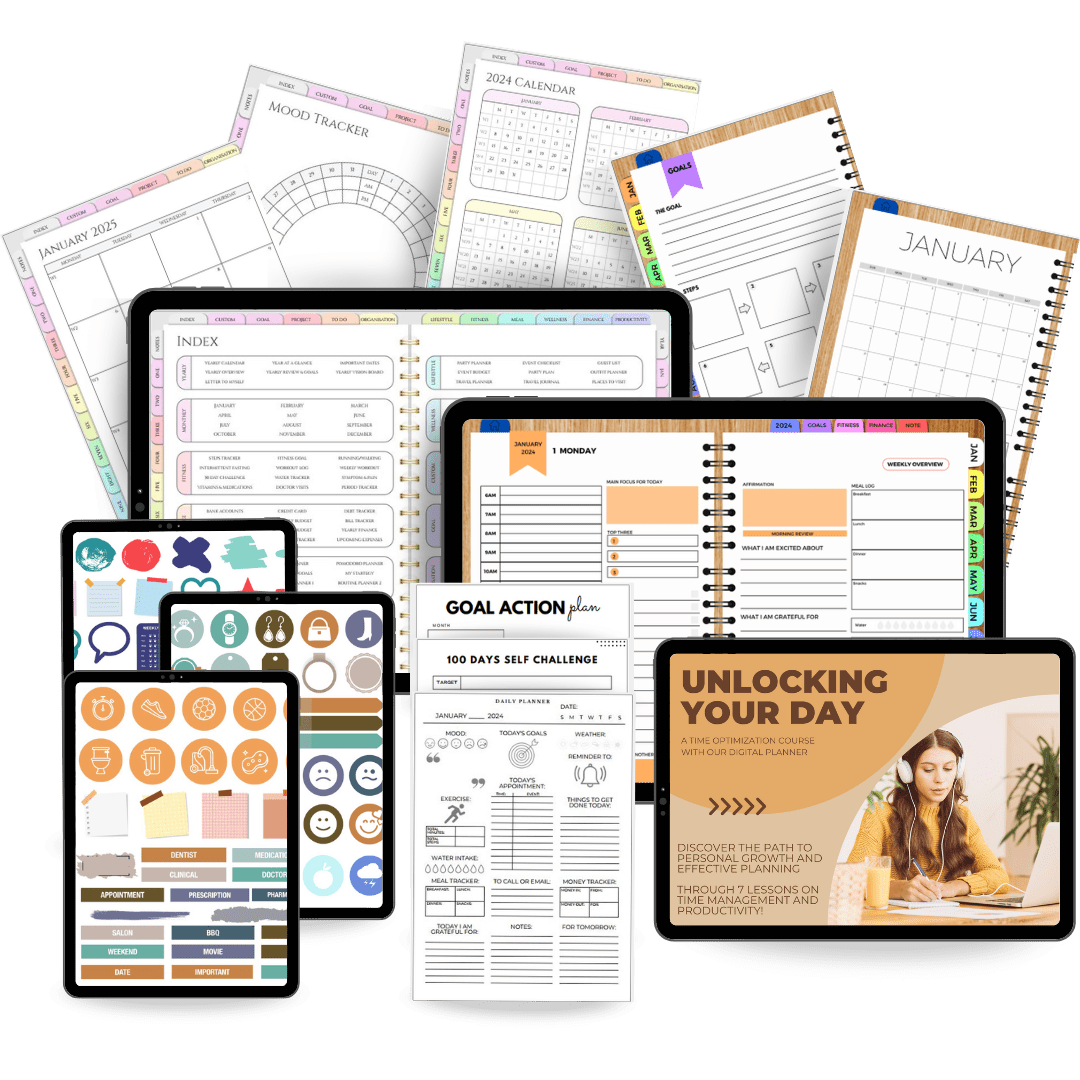
Navigate easily between document sections thanks to thousands of carefully designed hyperlinks. Use the homepage as your compass, and you'll have quick access to desired pages in just a few clicks.
Compatible with:

The Always Planner is compatible with Apple, Android, and Windows tools. It is designed to be used with any PDF annotation app: Goodnotes, Notability, Samsung Notes, Collanotes, Xodo, etc.
Synchronize your favorite devices

Enjoy automatic updates across all your devices, giving you access to your planner whenever you need it. Switch easily from one device to another and stay synced with your planner; simply use the same app on all devices and you're ready to go.
Quick and easy navigation
Navigate easily between document sections thanks to thousands of carefully designed hyperlinks.
Use the homepage as your compass, and you'll have quick access to desired pages in just a few clicks.
Compatible with:
The Always Planner is compatible with Apple, Android, and Windows tools. It is designed to be used with any PDF annotation app: Goodnotes, Notability, Samsung Notes, Collanotes, Xodo, etc.
Synchronize your favorite devices
Enjoy automatic updates across all your devices, giving you access to your planner whenever you need it. Switch easily from one device to another and stay synced with your planner; simply use the same app on all devices and you're ready to go.

ALL IN ONE DIGITAL PLANNER (English Version)
Complete Management
Manage every aspect of daily life without losing sight of yourself!
Over 30 goal templates

Unlock your full productive potential, reach personal milestones, and rediscover daily balance.
Over 30 goal templates
Unlock your full productive potential, reach personal milestones, and rediscover daily balance.
Over 30 fitness templates

Master your well-being, maintain dietary discipline, and track your workout progress.
Over 30 fitness templates
Master your well-being, maintain dietary discipline, and track your workout progress.
Over 30 finance templates

Start saving smartly to make your travel dreams come true or treat yourself to that dress you've always wanted.
Over 30 finance templates
Start saving smartly to make your travel dreams come true or treat yourself to that dress you've always wanted.
Over 40 note templates

Idea or stroke of genius? Notes? Take handwritten notes thanks to the notes section and never forget anything again.
Over 40 note templates
Idea or stroke of genius? Notes? Take handwritten notes thanks to the notes section and never forget anything again.
ALL IN ONE DIGITAL PLANNER (English Version)
Stunning Design
Each page is a style statement that makes your organizational journey a visually unparalleled experience.

Designed for effortless organization in every aspect of your life
Designed to integrate seamlessly into your daily life, it combines the classic benefits of paper planners with the modern versatility and customization you desire.
Getting started is a breeze, whether you're on your smartphone, tablet, or computer. You are just moments away from upgrading your planning experience.

Plan your months, days, and goals easily.
Embrace the serenity of a well-organized life with our daily, weekly, and monthly overviews. Say goodbye to stress, stay in control of important deadlines, and enjoy worry-free days. Your path to a more harmonious and serene life starts here.
Boost your creativity.
Elevate your daily life with chic and playful organization, using creative resources that meet all your needs.

Over 50,000 super colorful stickers
From cute icons to ornamental elements, these versatile resources will infuse your digital planner with charm and personalization (dates, labels, shapes, sticky notes, washi, watercolor shapes).
Choose Your Pack
Easy Pack
- 🔐 100% Secure payment
- 📥 Instant download
Premium Pack
- 🔐 100% Secure payment
- 📥 Instant download
Life Pack
- 🔐 100% Secure payment
- 📥 Instant download
Easy Pack 🌱
Premium Pack 🪴
Life Pack 🌳
Dated Version
2025–2027
+
Undated Version
(Reusable for life)
Dated Version
2025–2031
+
Undated Version
(Reusable for life)
Dated Version
2025–2036
+
Undated Version
(Reusable for life)
STICKERS
+1,000
STICKERS
+50,000
STICKERS
+75,000
TEMPLATE SECTION
+150
TEMPLATE SECTION
+300
TEMPLATE SECTION
+500
DIFFERENT THEMES & COLORS
❌
DIFFERENT THEMES & COLORS
✅
DIFFERENT THEMES & COLORS
✅
ANNUAL UPDATES
❌
ANNUAL UPDATES
✅
ANNUAL UPDATES
✅
+150 COVERS
❌
+150 COVERS
❌
+150 COVERS
✅
PRIORITY ACCESS TO NEW FEATURES
❌
PRIORITY ACCESS TO NEW FEATURES
❌
PRIORITY ACCESS TO NEW FEATURES
✅
🚫 It is not a subscription! 🚫
- 🔐 100% Secure payment guaranteed
- 📥 Instant download after purchase
★★★★★
(5 • Excellent)
★★★★★
(5 • Excellent)
★★★★★
(5 • Excellent)
★★★★★
(5 • Excellent)
★★★★★
(5 • Excellent)
★★★★★
(5 • Excellent)
 ★★★★★
(5 • Excellent)
★★★★★
(5 • Excellent)
★★★★★
(5 • Excellent)
★★★★★
(5 • Excellent)
★★★★★
(5 • Excellent)
★★★★★
(5 • Excellent)
★★★★★
(5 • Excellent)
★★★★★
(5 • Excellent)
 ★★★★★
(5 • Excellent)
★★★★★
(5 • Excellent)
 ★★★★★
(5 • Excellent)
★★★★★
(5 • Excellent)
 ★★★★★
(5 • Excellent)
★★★★★
(5 • Excellent)
 ★★★★★
(5 • Excellent)
★★★★★
(5 • Excellent)
 ★★★★★
(5 • Excellent)
★★★★★
(5 • Excellent)
★★★★★
(5 • Excellent)
★★★★★
(5 • Excellent)
★★★★★
(5 • Excellent)
★★★★★
(5 • Excellent)
★★★★★
(5 • Excellent)
★★★★★
(5 • Excellent)
★★★★★
(5 • Excellent)
★★★★★
(5 • Excellent)
★★★★★
(5 • Excellent)
★★★★★
(5 • Excellent)
★★★★★
(5 • Excellent)
★★★★★
(5 • Excellent)
★★★★★
(5 • Excellent)
★★★★★
(5 • Excellent)
★★★★★
(5 • Excellent)
★★★★★
(5 • Excellent)
★★★★★
(5 • Excellent)
★★★★★
(5 • Excellent)
★★★★★
(5 • Excellent)
★★★★★
(5 • Excellent)

More Questions?
Our customer service is available 24/7 to meet your needs.
Send an email
- Choosing a selection results in a full page refresh.
- Opens in a new window.